
Box dieline: how to make a packaging template to your own dimensions
Before the design comes the shape: the drawing by which a print shop cuts and folds a box. Which constructions exist, how to read the lines and how to get a free 1:1 file.
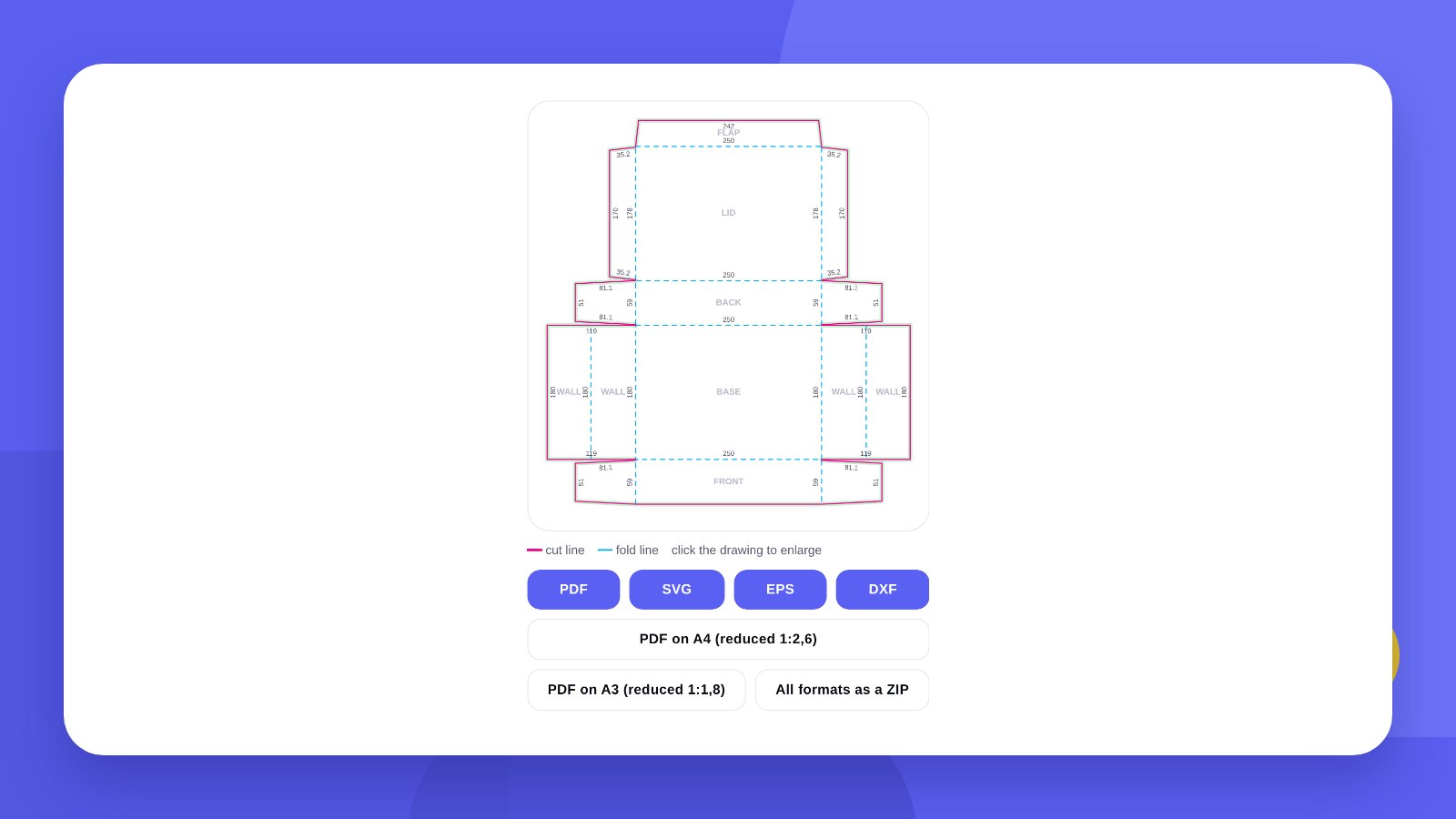
Packaging is the first thing a buyer sees, and in online retail often the only carrier of the brand. But before the design is drawn you need the shape: a dieline by which the print shop will cut and fold the box.
A dieline is usually drawn by a packaging engineer or the print shop itself – and that is a separate service. For standard boxes you can generate the drawing yourself: enter the width, depth and height and get a file at 1:1 scale.
- A dieline shows where the material is cut (solid line) and where it is folded (dashed line).
- The design must extend 2–5 mm beyond the cut line – that is the bleed.
- Before a print run, always cut out and fold a test sample.
TypesBox types: 23 constructions in the generator
The free generator holds twenty-three of the most popular constructions – from a shipping box to a gift “candy” box, plus envelopes and folders. For each one the tool builds a drawing to your dimensions, shows a 3D view and gives files for the print shop.
General purpose
| Type | Used for | Feature |
|---|---|---|
| Tuck-end box | Cosmetics, tea, candles, souvenirs | Lid and base with tuck flaps, side glue seam |
| Shipping box | Parcels, storage | Four flaps top and bottom, corrugated board |
| Mailer box | Online shops, gift sets | Folds without glue, hinged lid |
| Tray | Product display, confectionery | Open, with glued corners |
| Lid + base | Gifts, shoes, cakes, sets | Two parts on one drawing |
| Sleeve | A wrap for a box, tray or product | No base or lid |
| Paper bag | Shops, gifts, delivery | Side gussets, holes for handles |
Food and delivery
| Type | Used for | Feature |
|---|---|---|
| Pizza box | Pizzerias, delivery | Flat, for 250–400 mm sizes |
| Sushi box | Sushi bars, delivery | Hinged lid, optional window |
| Noodle (wok) box | Wok, rice, salads | Tapers downwards, four flaps on top |
| Burger box | Burgers, sandwiches, pastries | Two halves, a tab into a slot |
| French fries box | Fries, snacks, nuggets | Open top, tall back wall |
| Cake box with window | Cakes, pastries, desserts | Separate lid with a window |
Gift boxes
| Type | Used for | Feature |
|---|---|---|
| Candy box | Sweets, festive and children’s sets | Ends are tied with ribbon |
| Pillow box | Jewellery, cosmetics, gift cards | Curved flaps, no glue at the ends |
| Gable box with handle | Pastries, lunches, gifts | Folding roof and handles |
| Pyramid | Favour boxes, tea, wedding gifts | Sides meet at the top under a ribbon |
| Hexagonal box | Sweets, candles, tea | Six sides and a lid |
Envelopes and folders
| Type | Used for | Feature |
|---|---|---|
| Envelope | Letters, invitations, gift cards | Straight flap, side seams |
| DL envelope | Business mail, flyers | For an A4 sheet folded in three |
| Pointed-flap envelope | Invitations, greeting cards | Classic triangular flap |
| Presentation folder | Documents, proposals | One inside pocket |
| Two-pocket folder | Document sets, press kits | Pockets on both sides |
For food businesses. Boxes for pizza, sushi, noodles, burgers and fries are the most common request from cafés and delivery services. A printed logo on such packaging turns every order into advertising.
For gifts and holidays. The candy box, pillow, pyramid and gable box need no complex equipment: they are cut on a plotter even in small runs – for a wedding, corporate gifts or a seasonal promotion.
For an online shop. The mailer box and the lid + base box hold their shape without tape and look good in unboxing videos.
How-toHow to make a dieline: 5 steps
- Open the generatorGo to the Box dieline generator.
- Choose the box typeThe tool shows the drawing and a 3D view straight away.
- Enter the dimensionsBox size or product size – in the second case the tool adds the clearance and material thickness itself.
- Set the detailsWindow, hang tab with a euro slot, bleed, dimensions of every line.
- Download the filePDF, SVG or EPS for the designer and the print shop, DXF for a plotter or laser.
DrawingWhat the lines on a dieline mean
The cut line is solid, usually magenta. The packaging is die-cut along it. In the print-shop file it sits in a separate spot colour, CutContour.
The fold line is dashed and blue. The board is creased along it so that it folds evenly. A separate colour – Crease.
Bleed is the area around the cut line that background and pictures must extend into. If the knife shifts by a millimetre, no white strip is left at the edge.
The safe margin is an inset from the cut and the fold. Keep text and the logo away from the edge so they are not cut off or creased.
Print runHow many boxes fit on a sheet
Print shops print packaging on sheets and price it per sheet. The tighter the dielines sit on a sheet, the cheaper one box is. Sometimes reducing the height by a few millimetres is enough to fit twice as many on a sheet.
The generator counts how many dielines fit on an A3, SRA3, B2 or B1 sheet and gives you a PDF of the layout. It is a guide for the conversation with the print shop: they will make the final layout for their equipment.
HonestlyThe tool gives you the drawing. We design the packaging
The generator builds the shape: cut and fold lines to your dimensions. These are standard constructions with no adjustments for specific equipment – the manufacturer may fine-tune the final cutting die.
A buyer does not see a drawing; they see packaging in their hands. The logo, colours, texts, mandatory labelling and the way all of it sits on the sides of the box are a designer’s work. We will design the packaging in your brand style: write to us and send the dieline from the tool.
No drawing replaces a test sample. Cut the dieline out of your material, fold it and put the product inside – before you pay for a print run.
MeasuringHow to measure a product and work out the box size
Box dimensions are written in the order width × depth × height. Width and depth are the base; height is the distance from base to lid. Print shops and packaging engineers use exactly this order, so a mix-up here costs a print run.
- Measure the product at its widest pointsIncluding the cap, handle, pump – everything that sticks out.
- Add clearance2–3 mm on each side so the product slides in freely. For glass and ceramics, room for filler or an insert.
- Allow for material thicknessThe inner size is smaller than the outer by two wall thicknesses. For 3 mm corrugated board that is already 6 mm of difference.
- Check the proportionsA very low, wide tuck-end box holds its shape poorly: a mailer box or lid + base suits it better.
- Check delivery limitsCarriers price by size and weight. An extra centimetre of height sometimes moves a parcel into a more expensive band.
In the generator you can enter the dimensions of the product itself: clearance and material thickness are added automatically.
MaterialWhich board to choose
| Product weight | Material | Examples |
|---|---|---|
| up to 200 g | Board 270–350 gsm | Cosmetics, tea, jewellery, candles |
| 200 g – 1 kg | Heavy board or micro-flute | Tableware, sets, shoes, electronics |
| 1–5 kg | Single-wall corrugated board | Online orders, groceries |
| over 5 kg | Double-wall corrugated board | Appliances, wholesale deliveries |
This is a guide. The manufacturer makes the final choice: they know what is in stock and what will carry your product through shipping.
MistakesCommon packaging design mistakes
Text on a fold line. The board is creased at the fold and small letters break. Keep lettering 3–5 mm away from a fold.
Ink on the glue flap. Glue holds poorly on varnish and solid colour. The glue flap is left unprinted.
An upside-down lid. On a dieline some panels are “upside down” relative to the finished box. Before placing the logo on the lid, fold a paper sample and mark where the top is.
A barcode on a fold or on a coloured background. A till scanner will not read it. Place the barcode on a flat panel, dark on light.
No bleed. If the background ends exactly at the cut line, a white strip appears after die-cutting.
PreparationWhat to send to the designer and the print shop
- The dieline in vectorPDF or EPS with separate cut and fold lines. The design goes on a separate layer underneath.
- Material and run sizeThey determine the printing method and the price. Short runs are printed digitally, long ones by offset.
- FinishingLamination, spot varnish, foil stamping, embossing. Mention each of them in advance.
- ColoursIf the brand colour is critical, give the Pantone number.
- Mandatory labellingIngredients, manufacturer, barcode, marks – the list depends on the product category.
The drawing opens in Adobe Illustrator, CorelDRAW, Inkscape and Figma (SVG format).
FAQFAQ
Which dimensions do I enter?
Dimensions along the fold lines, that is the outer dimensions of the finished box. Or the product dimensions – the tool adds the clearance.
Will a print shop accept the file?
Yes, as a basis: PDF, EPS and SVG with separate cut and fold lines. The manufacturer may adjust the final cutting die to their equipment.
Can I cut the box on a plotter?
Yes, download the DXF: cut and fold sit on separate layers.
Do I need an allowance for board thickness?
For thin board usually not. For heavy board and corrugated, agree the allowance with the manufacturer.
Which program opens the dieline?
PDF, EPS and SVG – Adobe Illustrator, CorelDRAW, Inkscape. Figma also opens SVG. DXF – plotter and laser software.
Can I make a box of a non-standard shape?
The generator makes standard constructions. Complex locks, inserts and custom shapes are developed by a packaging engineer.
How do I add a window or a hang tab?
Switch on “Window” or “Euro slot” in the settings and set the size. The opening appears on the drawing as a separate cut outline.
Can I print the dieline at home?
Yes, if it fits on a sheet. Print at 100 % scale – it is the fastest way to check the dimensions.
How many boxes come out of one sheet?
The generator works out the layout for A3, SRA3, B2 and B1 sheets and shows the number of dielines per sheet.
We will design your logo and packaging in your brand style and prepare print-ready files.
Make a dielineDiscuss your packagingHigh quality
Years of experience let us take on projects of any complexity
Individual approach
Every client is unique. We create a unique concept for each of them
Professionals
Everyone on our team has extensive experience in advertising, development and design
Fast turnaround
Logo design takes 2–8 business days
GET IN TOUCH
Message us on Telegram, Instagram or by email – we reply quickly and gladly.