
How to prepare a file for print: bleed, safe margins and PDF
“The file is not suitable: we need 3 mm bleed, safe margins and a PDF.” What these requirements mean, why they exist and how to meet them in a few minutes.
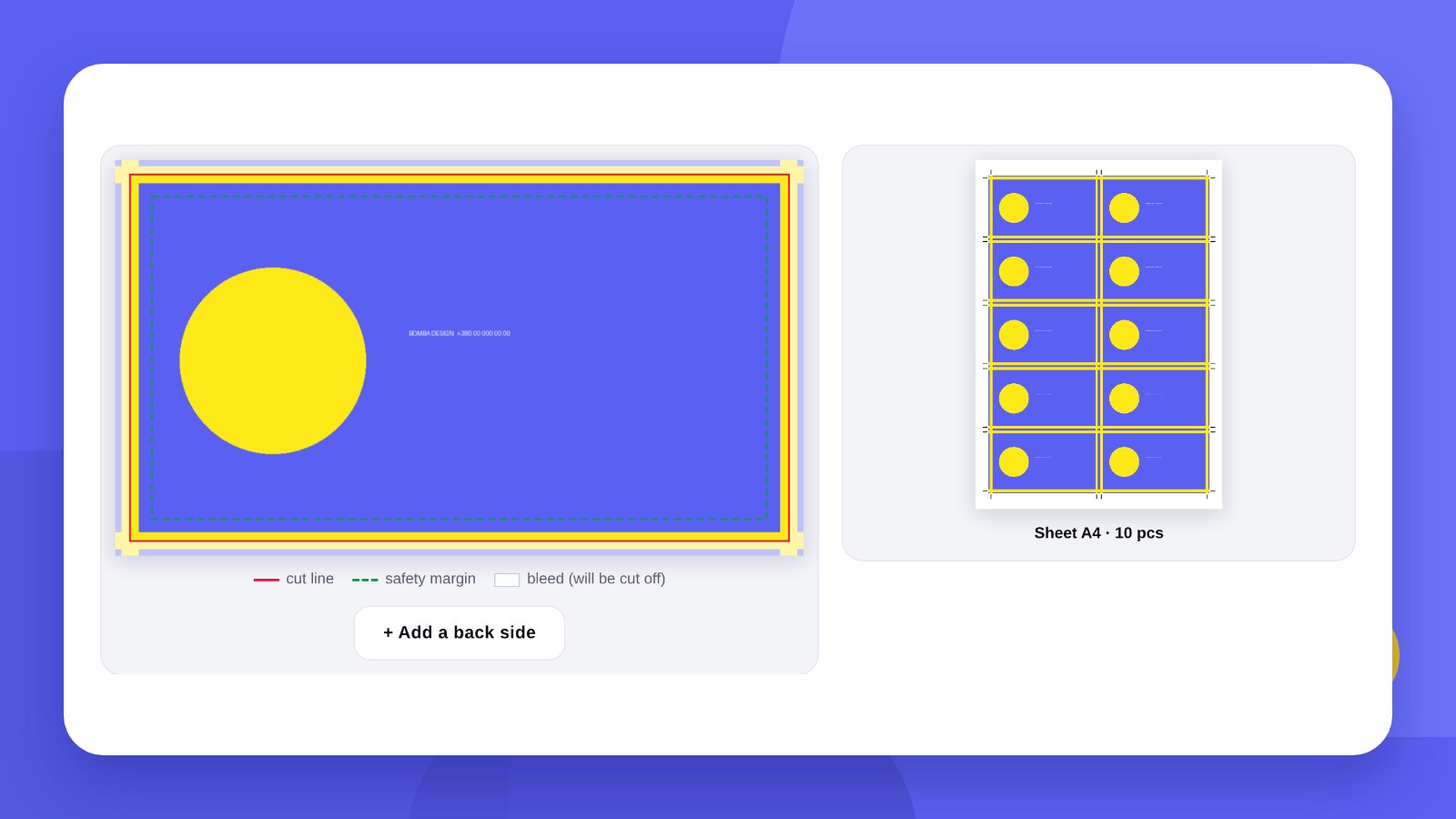
You made a business card in an online editor or got a picture from a designer, sent it to the print shop – and the answer was: “The file is not suitable, we need 3 mm bleed, safe margins and a PDF.” This is not a whim of the print shop but technical requirements without which a run can come out defective.
The good news: these requirements are the same almost everywhere, and there are not many of them. Let us go through each one.
- Bleed is 2–3 mm of extra background beyond the cut line, so no white strips appear at the edge.
- Important text and the logo must sit 3–5 mm from the edge – that is the safe margin.
- Print needs 300 dpi and a PDF file.
BasicsWhat bleed and safe margins are
Products are printed on large sheets and then cut in stacks. The knife can shift by a fraction of a millimetre. If the background ends exactly at the edge of a business card, a white strip appears on one side. So the background is extended beyond the edge – that is bleed.
The safe margin works in the other direction: text, the logo and important details are moved inwards from the edge so the knife does not catch them.
| Product | Finished size | Bleed | Safe margin |
|---|---|---|---|
| Business card | 90 × 50 mm | 2–3 mm | 4–5 mm |
| Postcard, A6 flyer | 105 × 148 mm | 3 mm | 5 mm |
| DL flyer | 99 × 210 mm | 3 mm | 5 mm |
| Sticker | to size | 2 mm | 3 mm |
| A3 poster | 297 × 420 mm | 3–5 mm | 10 mm |
Requirements differ slightly between print shops – check with yours before ordering.
How-toHow to prepare a file: 4 steps
- Open the toolGo to Print-ready file.
- Upload the artworkJPG, PNG or PDF. A two-page PDF becomes the front and the back.
- Choose the productBusiness card, sticker, postcard or your own size. Bleed and margins are added automatically, and the tool checks the resolution.
- Download the PDFA separate file for the print shop and a sheet layout with crop marks. There is EPS as well.
QualityResolution and colours
300 dpi. Print needs about 118 pixels per centimetre. A 90 × 50 mm business card is a picture of at least 1063 × 591 px, a little more with bleed. A picture from a messenger or a screenshot is usually too small.
RGB and CMYK. A screen glows; paper does not. Bright “neon” screen colours come out calmer on paper. If the brand colour is critical, ask the print shop for a colour proof or give the Pantone number.
Text. Small text under 6 pt and thin light lines on a dark background can fill in. Check that the smallest lettering is readable at real size.
HonestlyThe tool adds bleed. It will not draw the artwork itself
The tool prepares what you uploaded for print: it adds bleed, checks the resolution and builds the PDF. If the picture is too small or text is pressed against the edge, it will warn you but will not fix it.
Business cards, flyers, menus, stickers and gift certificates from scratch are what we design – in your brand style from the start and with files the print shop accepts without corrections: print design.
Print the artwork on an ordinary printer at 100 % scale and cut it out with scissors. You see at once whether the text is too small and whether anything is pressed against the edge.
FilesWhich formats a print shop accepts
| Format | When it fits | What to watch |
|---|---|---|
| Almost always – the main format | Bleed; fonts embedded or outlined | |
| AI, EPS, CDR | Logos, signs, plotter cutting | Software version, fonts outlined |
| TIFF | Photographs for quality print | 300 dpi at real size |
| JPG, PNG | Simple artwork, if the print shop agrees | Maximum quality, sufficient resolution |
| Word, PowerPoint | Not suitable | The layout shifts on another computer |
If the artwork was made in Word or PowerPoint, save it as PDF and check the result: the print shop will print exactly what the PDF shows.
TextOutlined fonts: what they are and why
If the print shop’s computer does not have your font, the software substitutes another – and the text “runs”. To prevent this, text is converted to outlines: the letters become a drawing that looks the same everywhere.
In PDFs from ordinary editors the fonts are usually already embedded. If a designer makes the artwork, ask for two files: a working one with live text (so it can be corrected later) and a final one with outlined text for print.
ColourBlack and large solid areas
Text in pure black. Small text is printed with black ink alone. If black is built from four inks, the slightest misregistration gives a coloured halo around the letters.
Large black areas in rich black. A solid black fill in one ink looks greyish. For a background a little of the other inks is added to black; the print shop will give the exact formula.
Solid fills on a fold. On cards and leaflets dark ink can crack along the fold. In such cases lamination or creasing is ordered.
White ink. Ordinary printing has no white: white is the colour of the paper. On kraft or coloured paper white will not print without a separate white ink.
ReferenceStandard print sizes
| Product | Size, mm |
|---|---|
| Business card, standard | 90 × 50 |
| Business card, European | 85 × 55 |
| Business card, US | 89 × 51 |
| A6 flyer | 105 × 148 |
| A5 flyer | 148 × 210 |
| DL flyer | 99 × 210 |
| A4 sheet | 210 × 297 |
| Tri-fold leaflet, flat | 297 × 210 |
| A3 poster | 297 × 420 |
| A2 poster | 420 × 594 |
ChecklistChecks before sending to the print shop
- SizeThe finished size of the product plus bleed on every side.
- BleedBackground and photos extend 2–3 mm beyond the cut line.
- Safe marginsText and the logo no closer than 3–5 mm to the edge.
- ResolutionEvery photo is 300 dpi at real size.
- TextProofread; phone numbers and addresses checked by calling and by opening the link.
- QR codeScanned from a printout. A vector code does not blur when enlarged.
- SidesIn double-sided artwork the front and back are labelled and oriented the same way.
- File formatPDF, one page per side of the product.
FAQFAQ
How much bleed is needed?
Most often 2–3 mm on each side. The print shop gives the exact figure.
Will a picture from Canva do?
Yes, if you download it in high quality. The tool adds bleed and checks the resolution.
What if the resolution is too low?
A picture cannot be enlarged without losing quality. You need a larger source file or vector artwork.
Which format should I ask the designer for?
A PDF with bleed for print and the same artwork in vector (AI, EPS or CDR) for the future.
What are crop marks?
Short lines at the corners of the sheet that show where to cut. They are placed outside the artwork, in the bleed.
Can I print from a JPG?
For simple products, yes, if the picture has 300 dpi and bleed. Converting it to PDF is more reliable.
How many dpi does a banner need?
For large-format print that is viewed from a distance, 72–150 dpi at real size is enough.
What are “outlined fonts”?
Text converted to outlines. Such artwork looks the same on any computer, but a word in it can no longer be corrected.
Why do colours on paper differ from the screen?
A screen glows and shows RGB colours, while print mixes CMYK inks. Bright blues, greens and neon shades come out calmer on paper.
We will design business cards, flyers, menus and stickers and hand over a file the print shop accepts without corrections.
Prepare a fileOrder print designHigh quality
Years of experience let us take on projects of any complexity
Individual approach
Every client is unique. We create a unique concept for each of them
Professionals
Everyone on our team has extensive experience in advertising, development and design
Fast turnaround
Logo design takes 2–8 business days
GET IN TOUCH
Message us on Telegram, Instagram or by email – we reply quickly and gladly.