
How to convert PDF to Word and Excel for free
A text PDF converts almost without errors; a scan has to be recognised. What to expect from each, when to choose Word or Excel, and how to check the result.
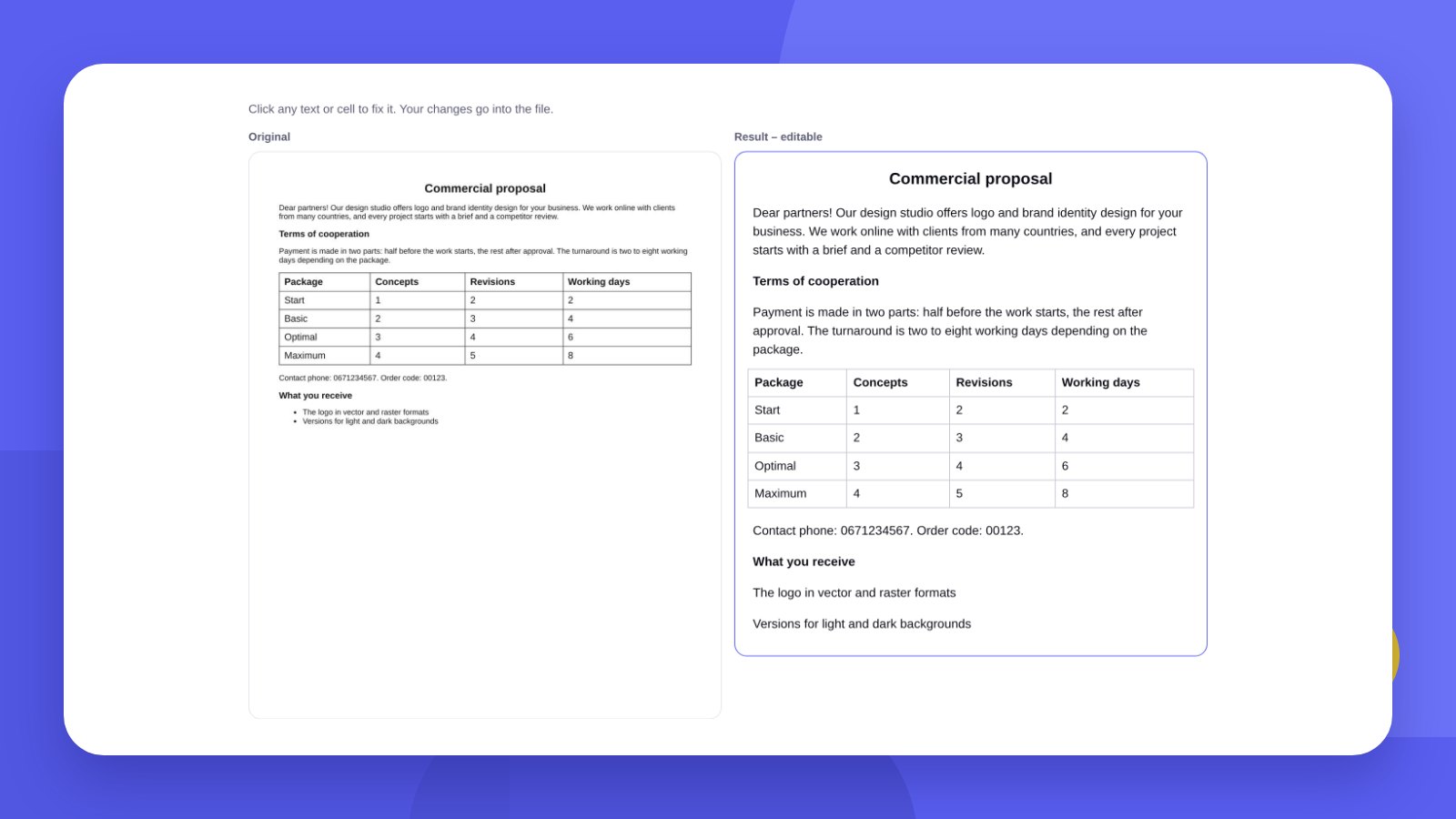
PDF was created so that a document looks the same on any device. That is exactly why it is so awkward to edit. To change contract terms, update a price list or add up totals, you need the document in Word or Excel.
There are two kinds of PDF, and the result depends on which one you have. In a text PDF the letters can be selected with the mouse – such a file converts accurately. A scan or a photo of a document is a picture, and the text has to be recognised from it.
- A text PDF is carried over almost without errors: paragraphs, headings, tables.
- Scans are recognised, but the result must be proofread – numbers and surnames above all.
- A converter that runs in the browser does not send the document to a server – important for contracts and invoices.
How-toHow to convert PDF to Word or Excel: 4 steps
- Open the converterGo to the PDF to Word and Excel tool. No sign-up is needed.
- Upload the PDFUp to 40 MB and up to 60 pages. If it is a scan, leave “Recognise scans” switched on.
- Check and correctThe original is shown on the left, the result on the right. Click a paragraph or a cell to fix it. Doubtful places are highlighted in yellow.
- Download the fileWord for text, Excel for tables, TXT if you only need the text.
ResultWhat is carried over and what is not
| Element | Word | Excel |
|---|---|---|
| Text and paragraphs | Yes | Yes, row by row |
| Headings, bold type | Yes | Bold |
| Tables | Yes | Yes, numbers as numbers |
| Pictures and logos | No | No |
| Columns, headers and footers | No | No |
| Formulas | – | No, values only |
In Excel each PDF page becomes a separate sheet. Amounts such as “7 900.50” are written as numbers, so you can add them up at once. Codes with leading zeros and phone numbers stay as text so the zeros do not disappear.
ScansHow to get a good result from a scan
Scan straight and at 300 dpi. Skewed or small text is recognised worse.
Avoid shadows and folds. A phone photo of a document will do if the sheet lies flat and is lit without the shadow of your hand.
Proofread the numbers. The most common errors are mixing up 0 and O, 1 and l, 5 and S. The tool highlights the places it is not sure about.
If you only need a table from a Word file rather than a PDF, use the Word to Excel tables tool.
HonestlyThe tool extracts the text. Designing the document is a separate job
The converter carries over the content: text, headings and tables. It will not make the document look good. If a commercial proposal, price list or letterhead has to look on-brand, you need a template in your brand style – with the company logo, fonts and colours. We design such templates to order: print and document design.
A recognised document is a draft. Before sending it to a client or to accounting, compare the amounts, dates and company details with the original.
CheckHow to tell a text PDF from a scan
Open the file and try to select one word with the mouse, or press Ctrl + F and search for a word that is definitely on the page.
If the word is selected and found, it is a text PDF: it was created from Word, Excel, accounting software or online banking. The conversion will be accurate.
If the whole page is selected at once or the search finds nothing, it is a scan or a photo. The text will have to be recognised, and the result depends on the image quality.
There is a mixed case too: a contract was printed, signed, scanned and saved as PDF. Such a file is also a scan, even if it started out as text.
ChoiceWhen you need Word and when Excel
| Document | Convert to | Why |
|---|---|---|
| Contract, addendum | Word | Paragraphs and clause numbering matter |
| Commercial proposal | Word | Text with small tables |
| Price list | Excel | Prices can be sorted and recalculated |
| Invoice, delivery note | Excel | Amounts become numbers straight away |
| Bank statement | Excel | Filters by date, amount, counterparty |
| CV, letter | Word | Continuous text |
| Report with tables | Both | Text in Word, tables separately in Excel |
The same PDF can be downloaded in both formats: Word first for the text, then Excel for the tables. There is no need to upload the file again.
ComparisonOther ways to convert PDF to Word
An honest word about the alternatives: sometimes they are more convenient.
Microsoft Word. Modern Word can open a PDF itself: “File” → “Open” → choose the PDF. It works well with simple text documents, worse with scans and complex tables. A licence is required.
Google Drive. Upload the PDF to Drive, right-click → “Open with” → “Google Docs”. It recognises scans too. The downside: the document goes to the cloud, and table formatting is often lost.
Paid online converters. They preserve the layout more precisely but usually limit the number of free files per day and process the document on their server.
The BOMBA DESIGN tool. Free, no sign-up and no limit on the number of files; the document does not leave your computer; the result can be corrected before downloading. It does not carry over pictures or complex layout.
After convertingTypical problems and how to fix them
Lines are broken mid-sentence. In a PDF every line is stored separately. The tool joins them into paragraphs, but in documents with an unusual layout some will have to be joined by hand.
The table has “shifted”. It happens when the cells in the PDF had no borders or held several lines of text. Check the table header and the last row with the total.
Numbers do not add up in Excel. If a cell is aligned left, it is text. The most common cause: a stray letter or space inside the number after a scan was recognised.
Dates turned into numbers or the other way round. Select the column and set the cell format to “Date”.
Strange symbols instead of letters. This happens with PDFs in which the font is embedded in a non-standard way. Ask the sender to save the PDF again from the source program.
FAQFAQ
Will the PDF formatting be kept?
Text, headings, bold type and tables are kept. Pictures, columns and the exact position on the page are not carried over.
Is it safe to upload a contract?
Yes. The file is processed in your browser and is not sent to a server.
In which languages are scans recognised?
English and Ukrainian.
What opens the finished file?
DOCX – in Word, Google Docs, LibreOffice. XLSX – in Excel, Google Sheets, LibreOffice Calc.
Is there a limit on the number of files?
No. The only limit is per file: up to 40 MB and up to 60 pages.
Can I convert a PDF to Excel if the table is a scan?
Yes. The tool recognises the text and restores the columns. Be sure to check the numbers afterwards.
Why are there errors in text from a scan?
Recognition depends on image quality. Shadows, skew, small type and a stamp over the text cause errors. The tool highlights doubtful words in yellow.
Can I convert a password-protected PDF?
No. First remove the protection in the program the document was created in, or ask the sender for a file without a password.
Are signatures and stamps carried over?
No, they are images. Only text and tables go into Word and Excel.
We will design templates for a commercial proposal, price list and letterhead in your brand style.
Convert a PDFOrder a designHigh quality
Years of experience let us take on projects of any complexity
Individual approach
Every client is unique. We create a unique concept for each of them
Professionals
Everyone on our team has extensive experience in advertising, development and design
Fast turnaround
Logo design takes 2–8 business days
GET IN TOUCH
Message us on Telegram, Instagram or by email – we reply quickly and gladly.