
How to reduce photo and PDF size to the limit you need
A portal accepts files up to 1 MB and your phone takes 6 MB photos. What to reduce first so the quality suffers least, and how to hit the limit exactly.
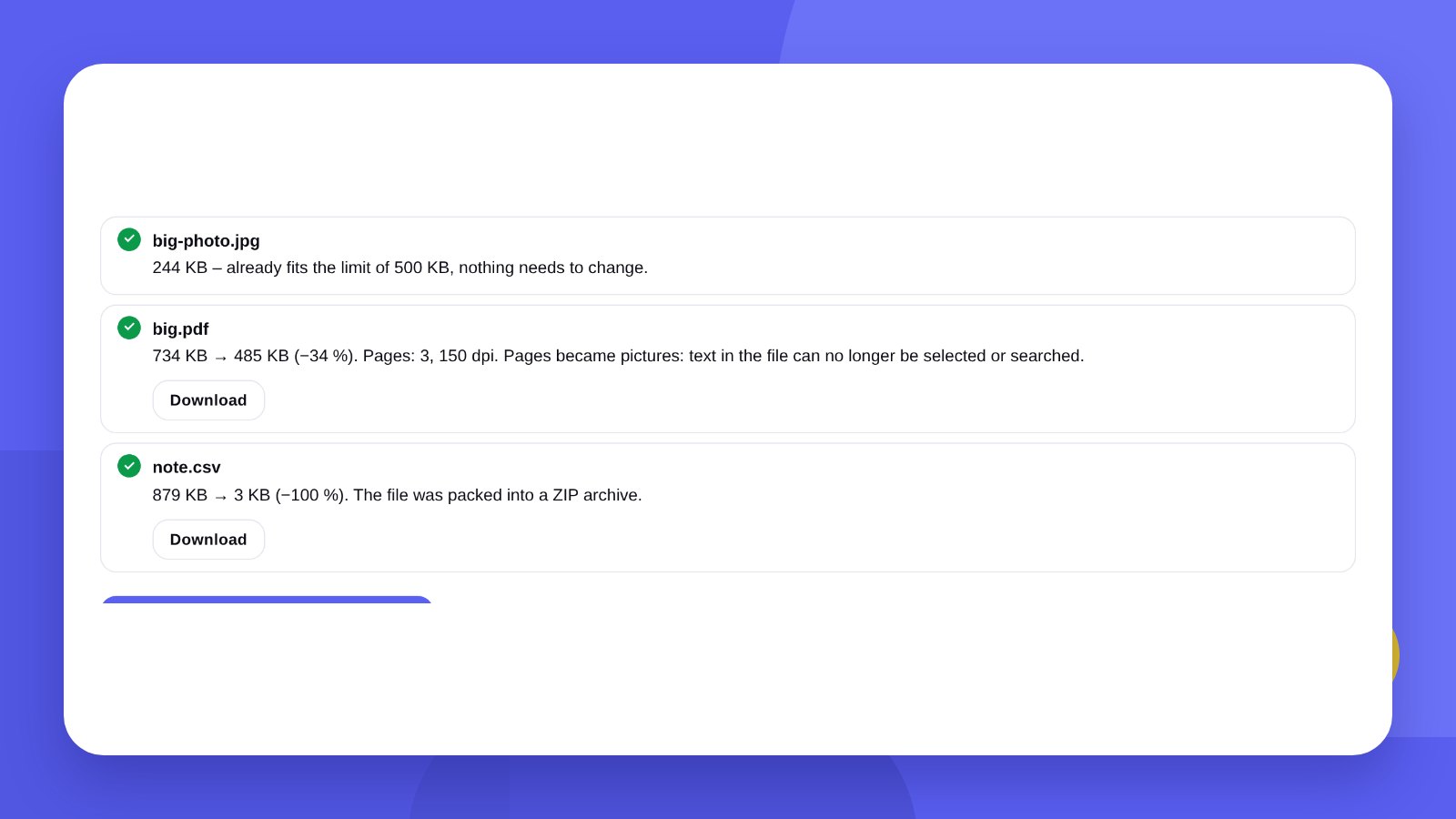
A government portal accepts a document photo of up to 1 MB. A job site takes a CV of up to 2 MB. A marketplace wants a product picture under 500 KB. Email will not send a message with more than 25 MB of attachments. And a phone takes photos of 5–8 MB each.
File size depends on two things: the number of pixels and the strength of compression. Both can be reduced – the only question is where to start so that quality suffers least.
- Lower the compression quality first: up to a point the eye does not notice.
- If that is not enough, reduce the picture dimensions in pixels.
- A PDF is compressed by turning its pages into pictures – the text can no longer be selected afterwards.
How-toHow to reduce a file to the size you need
- Open the toolGo to the File compressor.
- Choose the limit100 KB, 500 KB, 1 MB, 2 MB or your own size in kilobytes.
- Upload the filesUp to 30 at once: photos, PDFs and other files.
- Download the resultThe tool shows “before and after” for each file. Take them one by one or as an archive.
ReferenceTypical file size limits
| Where you upload | Usual limit | What to do |
|---|---|---|
| Forms and government portals | 1–5 MB per file | Reduce the photo to 1 MB |
| 20–25 MB per message | Compress the PDF or send a link | |
| Job sites | 2–5 MB | Compress the CV PDF |
| Marketplaces | 0.5–10 MB per photo | Limit the longest side |
| Messengers | They compress by themselves | Send as a file, not as a photo |
Limits differ between services and change from time to time – look for the exact figure in the error message or in the site’s help section.
QualityWhat happens to quality
Photos. A JPG at 70–80 % quality is almost indistinguishable from the original and weighs several times less. The difference shows only at strong magnification.
Logos and graphics. Pictures with a transparent background are saved as PNG – a lossless format, so to make them smaller the pixel dimensions have to be reduced.
PDF. Pages are redrawn as pictures at a lower resolution. Scans and presentations compress well, but afterwards the text cannot be selected or searched. For contracts where the text matters it is better to split the document into parts.
Word, Excel, video, archives. These formats are already compressed inside. An archive will not shrink them – only removing unnecessary pictures from the document helps.
HonestlyCompression does not replace the right files
The tool reduces what you already have. If your logo has to be compressed, converted and cropped every time, the problem is not the size – it is that you do not have a full set of files. Together with a logo we hand over every format and size at once: vector for print, PNG for the website and social media. See how we design logos.
Keep the original. A compressed file is a copy for uploading, not a replacement for the source photo or document.
ReferenceHow much ordinary files weigh
1 MB is 1024 KB. To see how much you will have to compress, compare your file with typical ones.
| File | Typical size | After reducing |
|---|---|---|
| Phone photo | 3–8 MB | 0.3–1 MB with no visible difference |
| Scan of an A4 page, 300 dpi | 1–3 MB | 150–400 KB |
| Screenshot | 0.5–3 MB | 100–400 KB |
| PDF presentation with photos | 10–50 MB | 2–8 MB |
| Text-only PDF | 50–300 KB | No need to reduce |
The figures are approximate: size depends on the camera, the amount of detail in the shot and the scanner settings.
FormatsJPG, PNG or WebP: which format is lighter
| Format | Used for | Notes |
|---|---|---|
| JPG | Photos, document scans | The smallest size, but no transparency |
| PNG | Logos, screenshots, graphics with a transparent background | Lossless; photos weigh 5–10 times more in it |
| WebP | Website images | Lighter than JPG, but not every portal accepts it |
| Multi-page documents | Size depends on the pictures inside |
If a portal asks for “JPG or PDF up to 1 MB” and your photo is a PNG or an iPhone HEIC, the simplest thing is to turn it into a JPG: the file shrinks several times even before compression.
TipDocument photos for portals and forms
- The whole document in the frameAll four corners visible, nothing cut off. A cropped document is rejected more often than a blurry one.
- Even lightNo flash, no glare and no shadow from the phone. Best of all by a window in daylight.
- Check legibility after compressionZoom in on the file: small text and the document number must be readable. If not, choose a larger limit.
- Do not compress twiceEach new JPG compression degrades the picture. Always compress the original, not an already reduced copy.
- Name the file clearlyLatin letters, no spaces: passport-1.jpg. Some portals do not accept other characters in a file name.
AlternativesHow to reduce a file without a tool
On iPhone. Email the photo to yourself from the built-in Mail app: before sending, the phone offers a size – small, medium, large or actual.
On Android. Many gallery apps have “Resize” in the edit menu. The name and location depend on the phone maker.
On Windows. Open the photo in Paint → “Resize” → enter a percentage → “Save as” JPG.
On Mac. Open the photo in Preview → “Tools” → “Adjust Size”.
These methods reduce a picture “by eye”: hitting the limit exactly rarely works the first time. The tool adjusts the quality itself until the file is smaller than the set size.
FAQFAQ
How do I reduce a photo to 1 MB?
Choose the 1 MB limit and upload the photo – the tool picks the quality and dimensions itself so that the file fits.
Will the quality get worse?
A little, but mostly unnoticeably. The smaller the limit, the stronger the compression.
Can I compress several files at once?
Yes, up to 30 files at a time, each up to 100 MB.
Are the files uploaded to a server?
No. Everything is processed in your browser.
How do I reduce a PDF to 1 MB?
Choose the 1 MB limit and upload the PDF. The tool lowers the page resolution until the file fits. The text in such a PDF becomes a picture.
Why did the file not get smaller?
Word, Excel, video and archives are already compressed inside. And if a photo is already under the limit, the tool keeps the original.
How is JPG different from PNG?
JPG compresses photos with a small loss of quality and weighs little. PNG keeps every pixel and a transparent background, so it weighs more.
Is there a limit on the number of files?
Up to 30 files at a time, each up to 100 MB. The number of runs is not limited.
Which limit should I choose if the portal gives no size?
Start with 1 MB: it is enough for document text to be readable, and most sites accept such a file.
We hand over the logo in every format and size at once – for print, the website and social media.
Reduce a fileLogo designHigh quality
Years of experience let us take on projects of any complexity
Individual approach
Every client is unique. We create a unique concept for each of them
Professionals
Everyone on our team has extensive experience in advertising, development and design
Fast turnaround
Logo design takes 2–8 business days
GET IN TOUCH
Message us on Telegram, Instagram or by email – we reply quickly and gladly.