
How to crop a photo for Instagram, Stories and a video cover
A social network will crop your photo itself, but not always where you want. Which proportions a post, a story and a cover need and how to prepare several photos at once.
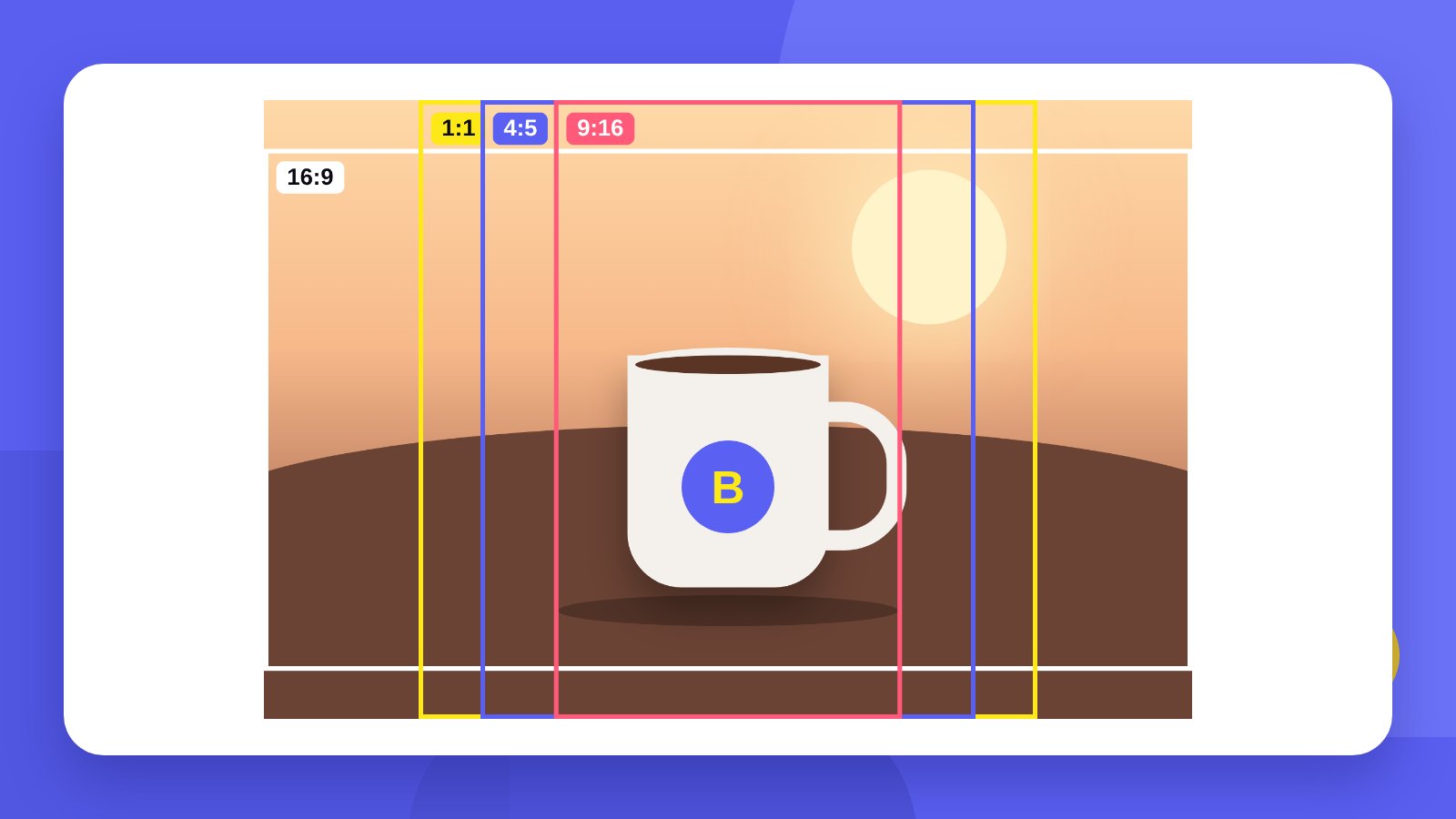
A phone photo is usually 3:4 or 16:9. An Instagram post, a story, a video cover or a product card on a website ask for something else. If you do not crop in advance, the platform does it for you – and may cut off the logo, the product or the caption.
The simplest approach is to crop the photo to the right format before posting: you see exactly what stays in the frame.
- An Instagram post is 4:5 (1080 × 1350 px) or a 1:1 square (1080 × 1080 px).
- Stories and Reels are 9:16 (1080 × 1920 px).
- The crop is centred: keep the main subject in the middle of the frame.
Cheat sheetPhoto proportions and sizes
| Format | Proportions | Size, px |
|---|---|---|
| Portrait Instagram post | 4:5 | 1080 × 1350 |
| Square post, avatar, product | 1:1 | 1080 × 1080 |
| Stories, Reels, TikTok | 9:16 | 1080 × 1920 |
| YouTube video thumbnail | 16:9 | 1280 × 720 or 1920 × 1080 |
| Camera photo | 3:2 | as in the original |
| Presentation, older screens | 4:3 | as in the original |
Platform sizes and rules change from time to time. Before a large ad campaign, check the current requirements in the platform’s help pages. Avatar and page cover sizes are in a separate article: social media image sizes.
How-toHow to crop a photo online: 4 steps
- Open the toolGo to Reduce file size.
- Choose the cropIn the Crop image field: 1:1, 4:5, 9:16, 16:9, 3:2 or 4:3. For an exact size, choose Custom size in pixels and enter the width and height.
- Set the weight and formatA file size limit, for example 1 MB, and a format: JPG, PNG or WebP.
- Add photosSeveral at once if you like. Download each one separately or all together as a ZIP.
Photos are processed in your browser and are not sent anywhere.
TipsHow to crop without losing anything
- Shoot with room to spareLeave free space around the product or person – there will be something to crop.
- Keep the subject centredThe tool crops from the centre. If the product is off to the side, do a rough crop in the phone gallery first.
- Keep text away from the edgesIn Stories the top and bottom are covered by the profile name, buttons and the reply field.
- Do not stretch a small photoA 600 px wide photo will not get sharper at 1080 px. Shoot at full resolution.
Profile gridHow a photo looks in the profile
The Instagram profile grid shows posts as portrait rectangles, so the edges of the frame may be partly hidden. Keep the logo, faces and product name closer to the centre – then the post looks good both in the feed and in the profile.
HonestlyThe tool crops photos. We design your social media look
The tool fixes size and weight. What makes a brand recognisable in the feed is consistent colours, typefaces and style – when people know the post is yours before they read the name.
Start with a logo: the avatar, covers and post templates are all built on it.
Keep the original photos. You can always crop later, but you cannot bring back what was cut off.
FAQFrequently asked questions
What size is an Instagram post photo?
A portrait post is 1080 × 1350 px (4:5), a square post is 1080 × 1080 px (1:1).
What size is a story photo?
1080 × 1920 px, proportions 9:16. The same format works for Reels and TikTok.
Can I crop several photos at once?
Yes. Add all of them – each is cropped to the chosen format, and you can download them all as a ZIP.
Where exactly is the photo cropped?
From the centre. If the important part is near an edge, trim the photo in your gallery first.
Can I set an exact pixel size?
Yes. Choose Custom size in pixels and enter the width and height.
Are photos uploaded to a server?
No. Processing happens in your browser.
We design a logo and brand identity that make avatars, covers and posts easy to put together.
Crop a photoOrder a logoHigh quality
Years of experience let us take on projects of any complexity
Individual approach
Every client is unique. We create a unique concept for each of them
Professionals
Everyone on our team has extensive experience in advertising, development and design
Fast turnaround
Logo design takes 2–8 business days
GET IN TOUCH
Message us on Telegram, Instagram or by email – we reply quickly and gladly.